Convert Audio to MIDI
SoundToMIDI turns a recording into estimated MIDI notes you can play with another instrument or edit in your DAW. Choose a phrase, listen to the detected notes, and download the Raw MIDI free.
Conversion runs in your browser. No sign-up or audio upload required.
Free Raw MIDI. Optional paid export for edits & scores.
Drop your audio or video here
MP3 · WAV · FLAC · M4A · OGG · AAC · MP4 · WebM · up to 100 MB — stays on your device
Best with one voice or instrument. Try a 15–30-second phrase.
File support & processing time
A short clip may take 30 seconds–2 minutes; longer audio can take several minutes or more. Device speed and the first model download affect timing.
MP4/WebM need a browser-readable audio track. If a video will not open, export MP3 or WAV. For files over 100 MB, shorten the recording or extract its audio.
Profiles adjust detection, pitch bends and cleanup. You can fine-tune them in Advanced settings.
Or record a solo voice or instrument · up to 60 seconds.
Choose the part to convert
Drag the markers or enter start/end times.
MIDI starts at your selection; pauses are preserved.
Advanced settings
Loading the AI model…
Transcribing…
Your MIDI is ready
Listen to your MIDI
Speed & loop affect MIDI preview only, not exports.
Edits and scores are in the optional export pack below.
Export your edits & score
Edited MIDI · PDF · MusicXML · 2 practice WAVs
Save conversion projects and use AI arrangements with an account. Audio backup is optional.
No account needed. Return to this browser to download; files stay here for 7 days.
One-time purchase · 8 files · Same-result edits included
Download demo pack (.zip)Pack contents, sample & terms
Project saves include edits, settings and MIDI. Audio is uploaded only when you choose audio backup. Saving uses no exports.
- Edited MIDI — Open in your DAW
- Score PDF + MusicXML — Print or edit a draft with note names
- 2 practice WAVs — Listen at original & half speed
- Note-map PNG — See piano keys, pitches & timing
- Note list CSV — Exact pitches, start times & lengths
- Quick-start guide — File tips & your export settings
One export unlocks one project, including later edits. Purchased exports do not expire. Cloud saving is optional. Score drafts need review; practice WAVs support up to 10 minutes. Terms · Payment help
Edit notes & timing
Open MIDI editorAdjust Edited MIDI
Refines detected notes; does not improve the transcription model.
Your sheet music draft
Automatic draft. Review notes and rhythm before export.
Score settings & limitations
Bar offset adds leading rests to align a pickup; it must be smaller than one bar. Notes below the split go to the bass staff. Empty staves are omitted. Tempo comes from your MIDI timing controls.
PDF and MusicXML use this score; MIDI keeps your edited timing.
Automatic draft · Fixed tempo · Sixteenth-note grid · Suggested hand split. Review notes and rhythm; tuplets, pedal, fingering and tempo changes are not inferred. Swipe sideways inside the paper on small screens.
Edit notes & timing
Edits affect Edited MIDI; Raw MIDI stays unchanged.
Reset edits before changing automatic cleanup. Reset can be undone.
Download ready. Further edits and downloads of this project use no additional exports.
Adjust range, pitch & timing
Edit individual notes
Select a note, edit, then Apply. Times are seconds from your selection’s start.
Saves edits, settings and Raw + edited MIDI. Save again after changes.
MIDI details
Was this result useful? Optional
How to turn audio into MIDI notes
- Choose a recording
Select a local audio file up to 100 MB, or record a short phrase with your microphone. Start with one clear voice or instrument.
- Select a phrase and convert
Listen to the audio and adjust the start and end of the passage. Choose General, Voice, Piano & Guitar or Bass, then press Convert selection to MIDI.
- Check the notes and download
Compare Original audio with Raw MIDI. Use Download Raw MIDI to save the detected notes free, then load the .mid file on an instrument track in your DAW.
Listen before you keep the result
Audio stores sound; MIDI stores instructions for playing notes. The converter estimates those notes with Spotify’s open-source Basic Pitch model. It cannot recover the original instrument, lyrics or studio session.
Compare a short phrase in Original audio and Raw MIDI. Check the melody first, then listen for missed notes, extra notes and pitches an octave too high. Delete obvious extras before changing the timing. For a crowded mix, use a cleaner isolated part instead of repeatedly converting the same full song.
Try an example with a known mistake
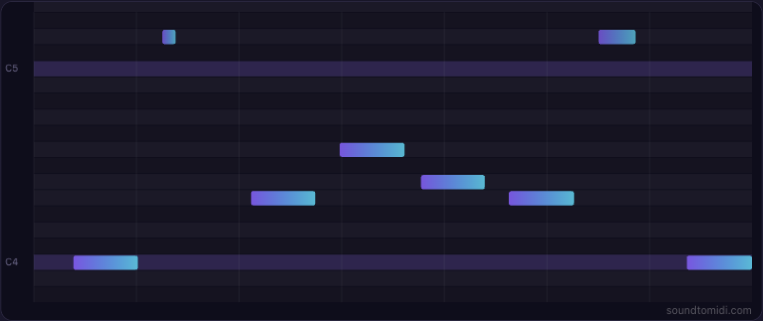
Our original eight-second synthesized melody contains eight source notes. The saved Raw MIDI test found all eight and added two high notes. This is a controlled example, not a real-song accuracy score.
Use the notes in your project
Download Raw MIDI and import it into an instrument track in FL Studio or Logic Pro. Choose a sound before pressing play: a MIDI file has no recorded voice or instrument of its own.
You can also preview and edit notes here, or open an existing MIDI file in the MIDI editor. Exporting those edits uses the optional Music Export Pack; you can check the current offer and preview the result before buying. Cloud backup and AI arrangement are separate features that require your explicit upload consent.
For recording-specific help, see MP3 to MIDI, WAV to MIDI or humming to MIDI.
Audio to MIDI questions
Do I need an account, and how many conversions are free?
No account is needed for audio conversion or Raw MIDI downloads, and there is no daily conversion quota. Listening and on-page editing are also free. Exporting on-page edits uses the optional Music Export Pack; the original Raw MIDI stays free. Cloud project saving requires an account.
Does the downloaded MIDI have a watermark?
No. The free Raw MIDI file has no watermark. It contains estimated note events rather than a recording, so it does not contain an audio watermark or preserve the original instrument sound.
How long does audio-to-MIDI conversion take?
There is no fixed completion time. The first run needs to download and initialize the model; processing then depends on the selected passage, your browser and your device. Try a short phrase first and follow the progress indicator. You can cancel and keep the recording available for another selection.
Which audio files and recordings can I use?
You can select MP3, WAV, FLAC, M4A/AAC or OGG, and MP4/WebM files with audio your browser can decode. The file picker accepts one file at a time, up to 100 MB. Clear piano, guitar, bass, solo singing or humming is a better starting point than several instruments mixed together. This tool does not fetch audio from streaming links.
What does audio-to-MIDI conversion produce?
It produces a standard .mid file containing estimated pitches, note starts, durations and velocities for the passage you selected. MIDI has no pixel dimensions and is not an MP3 or WAV recording. Assign a software instrument after importing it into a DAW. The optional export pack also provides edited MIDI and score or practice files; it does not run a stronger transcription model.
Can it recover every instrument or drum in a complete song?
No. This converter does not separate a finished song into reliable instrument or drum tracks. Overlapping parts, percussion and reverb can hide notes or create extra notes and octave errors. Use an isolated part or stem when available, and correct the detected notes by listening to the source. Ask for the original MIDI if you need the exact performance.