An audio-to-MIDI converter can find the right notes and still give you a file that needs editing. These three examples show what happened when we selected short WAV files in SoundToMIDI, converted the full recording, and downloaded the free Raw MIDI through the browser interface.
The clips are original synthesized test signals, not recordings of a pianist, singer, or commercial song. We generated them so we know which pitched notes went in. They are useful for explaining errors, but they do not establish an accuracy rate for real music. You may download the clips to repeat these checks.
What we tested
The check ran on September 28, 2026 in desktop Chrome 153 on macOS. All files are 8-second, mono, 22,050 Hz WAVs. We used the General profile and converted the full clip with the same settings each time:
- Onset confidence: 0.5
- Note confidence: 0.3
- Minimum note length: 130 ms
- Tempo: 120 BPM
- Pitch bends: off
These are Raw MIDI results. No paid cleanup, manual note editing, or cherry-picked parameter changes were applied. A matched note must have the same MIDI pitch as a source note and start within 150 ms, with each event matched only once. That check does not score note length, velocity, musical expression, or how natural the result sounds.
| Input | Pitched source notes | Raw output notes | Matched source notes | Extra notes |
|---|---|---|---|---|
| Isolated melody | 8 | 10 | 8 | 2 |
| Chords with percussion | 12 | 15 | 12 | 3 |
| Percussion without pitched tones | 0 | 0 | Not applicable | 0 |
Keep the inputs and settings the same if you repeat the test. Different devices, inference backends, or future model versions may change the output slightly. This is a dated observation, not a promise of identical results everywhere.
Example 1: eight melody notes, plus two false high notes
The source plays C4, D4, E4, G4, F4, E4, D4, C4, one at a time. Each note lasts 0.6 seconds, with a gap before the next. The synthesized tone includes harmonics, so it is more than a pure sine wave, but it is still much simpler than a microphone recording.
Download the source WAV · Download the actual Raw MIDI
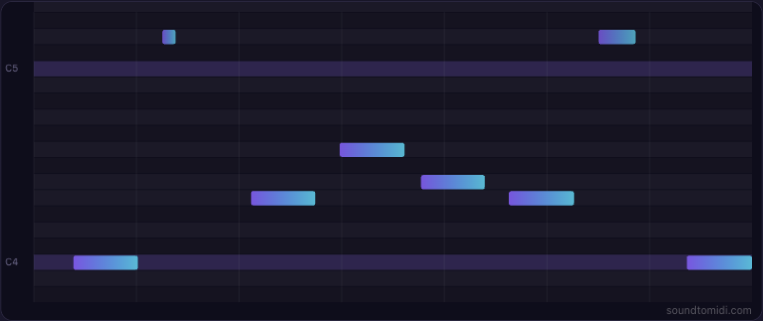
All eight source notes had a matching output event. The file also contained two D5 notes that were not in the source score. Both occur around a D4 note, one octave below. The octave relationship is visible in the output; interpreting it as harmonic confusion is a plausible explanation, not a diagnosis of the model’s internal reasoning.
The matching note starts were within about 16 ms of the source in this run. That narrow timing result says nothing about whether every note sustains for the correct length. Listen while watching the piano roll: the two high notes are a practical reason to check an automatic transcription before playing it back with a bright instrument.
For this file, the editing job is straightforward: compare the two high D5 events with the source, remove them if you want the original eight-note phrase, then inspect note endings. You can do that in your DAW without buying the optional cleaned export.
Example 2: chords survive, but three extra notes appear
This input has three four-note voicings and a repeating, synthesized noise-percussion pattern. The voicings are C3/C4/E4/G4, F3/C4/F4/A4, and G3/B3/D4/G4. Each chord lasts 1.5 seconds.
Download the source WAV · Download the actual Raw MIDI
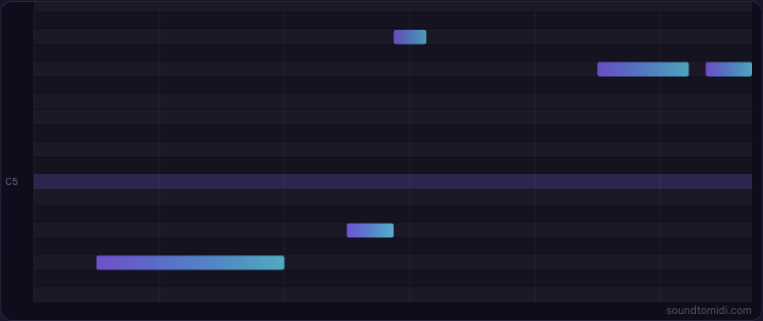
The converter returned 15 notes. All 12 pitched source events had a match, but the output added one A5 and two G5 events. The transcription therefore captured the chord pitches without being an exact reconstruction.
This is not a finished-song test. There is no singing, room noise, reverb, guitar strumming, or mastering compression in the source. The example does not establish that the tool will separate instruments or transcribe a full commercial mix. If your recording has several parts competing for the same range, try a stem you own or have permission to use, then compare it with the full mix yourself.
Also, a pitch model’s response to noise is not a General MIDI drum track. You will not get separate kick, snare, and hi-hat lanes from this workflow.
Example 3: percussion produces no notes
The final clip contains only short bursts of seeded noise. There are no pitched source notes. It is intentionally unsuitable for a pitched-note transcription model.
The converter reported that it detected no notes and offered a clear solo voice or instrument, a shorter phrase, or the quieter-note retry option. No MIDI file was produced. We did not fabricate an empty download to make the test look successful.
Here, no output is more useful than a set of invented pitches. If you need a drum pattern, use drum-specific transcription or enter the rhythm in your DAW. Lowering a pitch-detection threshold is not a reliable way to turn noise into drum events.
Repeat the checks with your own recording
- Download one source WAV above and open the converter.
- Choose General, select the file, and keep the full 8-second range.
- Confirm the settings above and choose Convert selection to MIDI.
- Listen to the original and Raw MIDI previews. Download the free Raw MIDI and inspect it in your music software.
- Then try a 10–30 second phrase from your own recording. Check pitches, extra notes, missed notes, and note lengths separately.
The optional Cleaned MIDI preview applies rules to detected notes, overlaps, and timing. It does not run a stronger transcription model or know the intended score. Listen before deciding whether that version helps.
For an independently inspectable record, download the source note schedule and full observed output notes. Those files include every detected note in these runs, not just the matches. The source signals use additive synthesized tones and deterministic noise; no third-party recording was used.