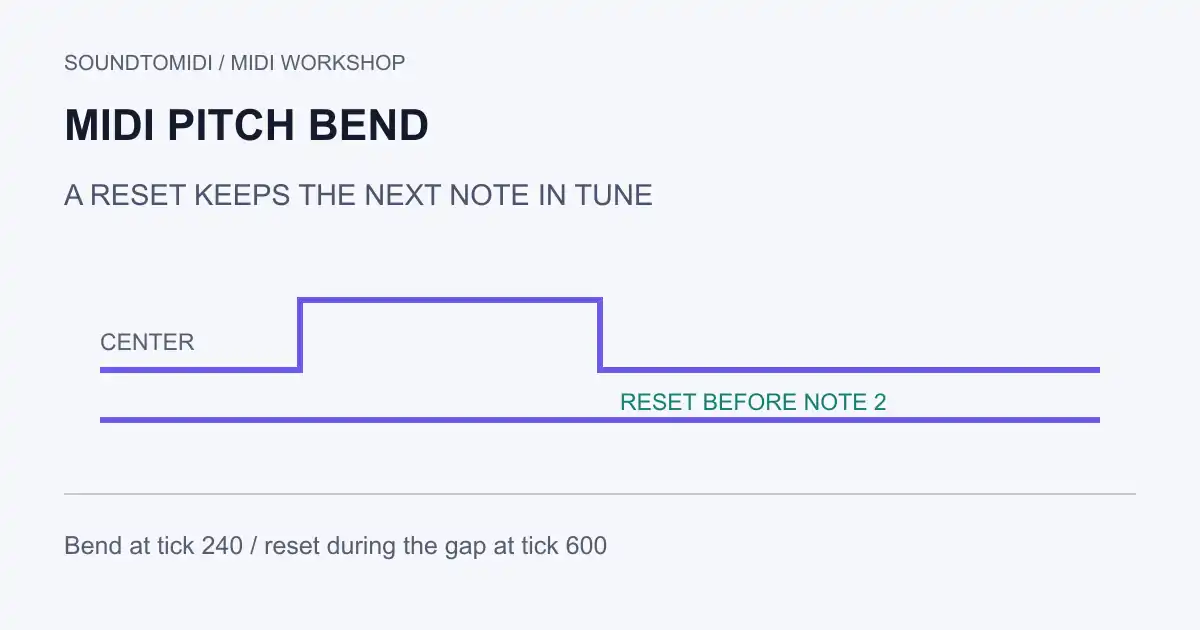
MIDI pitch bend changes the sounding pitch without changing the note number. If the next note starts out of tune, look for a missing bend reset before moving notes in the piano roll. Use a DAW that exposes pitch-bend events; SoundToMIDI’s note editor is not a pitch-bend editor and is not a lossless route for these controllers.
The three things to check are the stored bend value, the receiving instrument’s bend range, and the channel receiving the message. A correct curve with the wrong range can still sound wrong.
Read the value before changing the note
In the unsigned 14-bit representation, bend values run from 0 to 16,383 and the center is 8,192. Some editors instead display signed values with zero at the center. Do not type 8,192 into a signed field just because you saw that number in a file inspector. Oracle’s MIDI channel reference documents the unsigned values, channel-wide behavior and receiver-controlled sensitivity.
| Stored unsigned value | Signed equivalent | Meaning |
|---|---|---|
| 0 | -8,192 | Lower end of the configured range |
| 8,192 | 0 | Center: no bend |
| 12,288 | 4,096 | Halfway through the positive value span |
| 16,383 | 8,191 | Upper end of the configured range |
The last row is not a universal number of semitones. With a receiver set to a two-semitone range, a value around 12,288 is approximately one semitone up. Change the range and the same data produces a different interval. Check the instrument’s settings or manual instead of assuming every patch uses the same range.
Try the missing-reset example
These are original diagnostic files, freely downloadable without an account:
Both contain MIDI notes 60 and 64 on channel 1, at 120 BPM and 480 ticks per quarter note. The first starts at tick 0, a bend of 12,288 arrives at tick 240, and the first note ends at tick 480. The second starts at tick 720. The reset version adds a center message at tick 600, during the gap. Both files finally reset at tick 1,200.
Import each into a separate empty project or reset the instrument between trials. Set the same bend sensitivity and use a sustained patch that responds to pitch bend. A short percussive patch may decay before the bend becomes obvious. Inspect the event list as well as listening: the files demonstrate event placement, not a guarantee about a particular synthesizer’s sound.
We independently parsed the notes and bend values. We did not benchmark these files in every DAW or instrument.
Repair the affected passage
- Save a copy and identify the channel of the note that drifts.
- Open that channel’s pitch-bend lane. Check immediately before the note, not just within its visible rectangle.
- Confirm the instrument’s intended bend range. Avoid compensating for the wrong range by redrawing an otherwise correct curve.
- Insert a center message where the bend should end. For separated notes, the gap before the next note is a convenient place.
- Play from before the first bend, through the next phrase, then export and reopen a copy in the destination application.
Do not clear every bend in a performance merely to fix one late reset. A guitar slide or expressive lead may rely on the curve you are deleting. Compare the repaired passage against the original before committing the change.
Why does a chord bend together?
Ordinary channel pitch bend affects the notes receiving that channel’s messages. It does not target one rectangle by its note number. If only the top voice should slide, your instrument and routing need to support that separation; moving one event in a piano roll is not enough.
Also distinguish pitch bend from an octave mistake. A note stored as 72 instead of 60 has a different note number and needs a pitch or octave correction. A note that sounds sharp only after a slide is a better candidate for bend inspection. If the pitch is right but the sound changes halfway through, inspect program changes instead.
Keep the controller-bearing original when using a simplified editor to inspect notes. A note-only export can look correct while losing the expression that made the performance work.