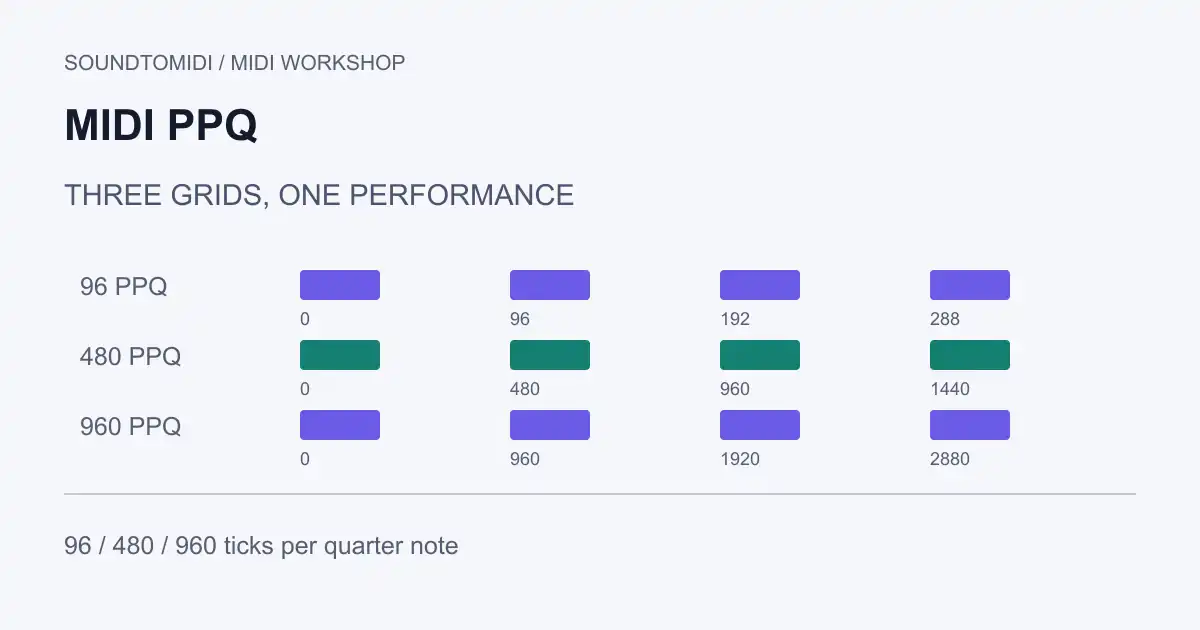
MIDI PPQ is the number of timing ticks in one quarter note. It describes how finely a tempo-based MIDI file can place events, not the recording’s sample rate or the instrument’s sound quality. Raising PPQ does not recover timing detail that was never recorded.
To change PPQ while preserving a performance, rescale event times as well as the file’s resolution. Changing only the header can change playback timing. Keep this operation in a DAW or MIDI library that supports it; SoundToMIDI’s note editor does not expose a PPQ conversion control.
Three resolutions, one phrase
Our three original files contain the same four notes at 120 BPM:
| Resolution | Quarter-note spacing | Eighth-note duration | One tick at 120 BPM |
|---|---|---|---|
| 96 PPQ | 96 ticks | 48 ticks | About 5.208 ms |
| 480 PPQ | 480 ticks | 240 ticks | About 1.042 ms |
| 960 PPQ | 960 ticks | 480 ticks | About 0.521 ms |
All three have note starts at 0, 0.5, 1 and 1.5 seconds, with a duration of 0.25 seconds per note. We checked those values with an independent parser. The reference files contain simple note data and a constant tempo; they are not a demonstration of preserving every controller or tempo-map edge case.
Import each with the same instrument. A DAW may convert incoming files to its own project resolution, so a ruler displaying a new tick count does not automatically mean the music changed. Compare the note positions in beats and seconds.
Calculate the time represented by a tick
For a constant tempo measured in quarter notes per minute:
seconds per tick = 60 / (BPM × PPQ)
seconds at a tick position = ticks × seconds per tick
At 120 BPM and 480 PPQ, 720 ticks represent 0.75 seconds. At 960 PPQ, that same position needs 1,440 ticks. Those calculations are our worked example; they are not performance measurements.
The Java MIDI Sequence reference distinguishes tempo-based PPQ resolution from SMPTE timing measured in ticks per frame. The equations above apply to PPQ files. Do not use them unchanged on a file with SMPTE timing.
Rescale the events, not just the header
Suppose a file uses 480 PPQ and you want 960:
scale factor = 960 / 480 = 2
new tick position = old tick position × 2
new note length = old note length × 2
A note starting at tick 720 and lasting 240 ticks becomes a note starting at 1,440 and lasting 480 ticks. Tempo remains 120 BPM. In this exact integer example, its audible timing stays unchanged.
For a real file, include note-off events, controllers, tempo-change positions and the end-of-track position. Do not scale tempo values themselves: their event positions may move in ticks, while their microseconds-per-quarter-note values stay the same. If the file has multiple tracks, use the same conversion throughout.
Mido’s MIDI-file documentation explains that message times within tracks are delta ticks. An implementation must handle that representation correctly. Working from absolute positions and then reconstructing deltas can make rounding decisions easier to inspect; blindly rounding every small delta can accumulate drift.
Does higher PPQ make a file more accurate?
It permits smaller timing increments, but it cannot infer a more accurate performance from coarse input. Converting a 96-PPQ file to 960 PPQ multiplies its positions by ten; it does not invent nine useful intermediate positions between each old tick.
Reducing resolution can require rounding. At 480 PPQ, an event at tick 1 cannot be represented exactly at 96 PPQ. Decide how much timing error is acceptable for the destination. Check very short notes, repeated attacks and controller bursts, where rounding may collapse distinct events onto the same tick.
This is separate from quantization, which deliberately moves events toward a musical grid. You can have a high-resolution file with heavily quantized notes or a lower-resolution file with off-grid timing.
Check an export before replacing the original
Choose checkpoints near the beginning and end, plus both sides of any tempo change. Compare note count, pitch, onset time and duration. Confirm that controllers remain present and the destination can read the file. A fixed-tempo formula is insufficient across a tempo map; time must be accumulated over each tempo segment.
Keep the original until the receiving project plays correctly. PPQ conversion is usually an interchange detail, not a reason to repeatedly reprocess a working MIDI performance.