Choose the kind of CSV you need before converting MIDI. A note table is convenient for pitches, starts, lengths and velocities. An event CSV represents the underlying MIDI messages, including items such as tempo and program changes. A note-only spreadsheet is not enough to reconstruct every detail of an arbitrary MIDI file.
If you are counting notes or comparing a transcription with a reference, a note table is usually easier. If you need a reversible text representation for scripting or debugging, use an event-preserving converter and keep its format intact.
Two views of the same phrase
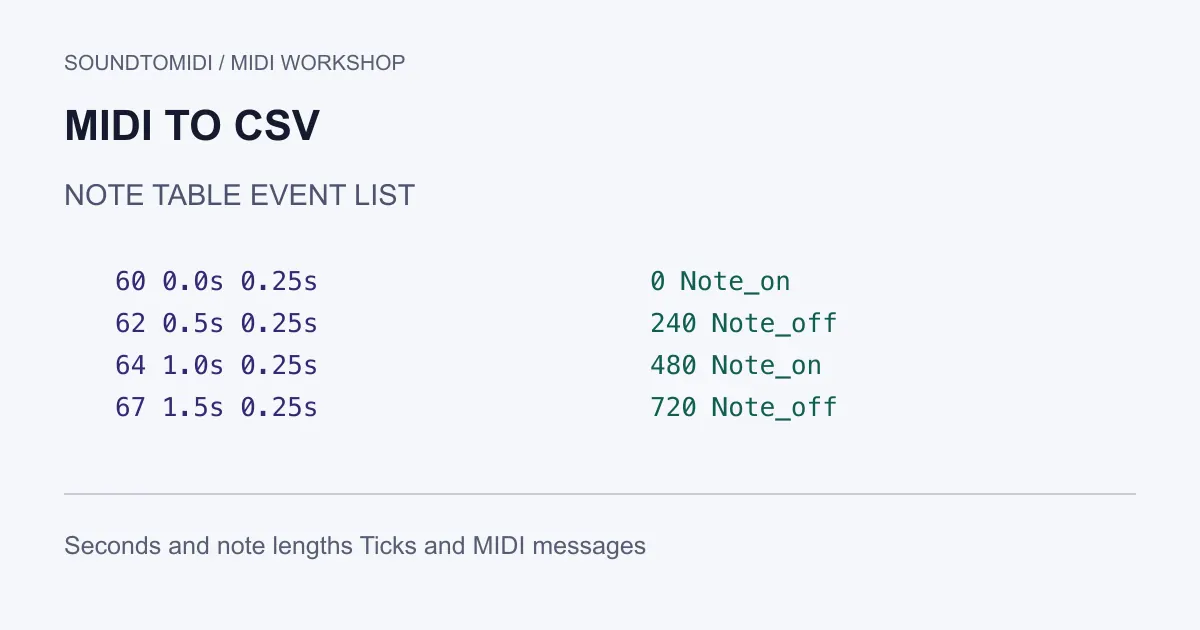
We constructed a four-note MIDI file and provide both representations:
The note table has four data rows. Pitch 60 starts at 0 seconds; pitch 62 at 0.5; pitch 64 at 1.0; pitch 67 at 1.5. Each lasts 0.25 seconds with velocity 80. The event list has more rows because note starts and releases are separate messages, alongside the header, tempo and track boundaries.
These are constructed examples with known events, not customer files or a claim that audio transcription recovers every event correctly. Their small size lets you inspect the differences before applying a workflow to your own material.
Read timing units before doing calculations
| Field or representation | What the value means |
|---|---|
| Our note table’s start_seconds | Elapsed time from the file’s beginning |
| Our note table’s duration_seconds | How long this note lasts |
| MIDICSV event time | Absolute tick position within its track |
| Mido track message time | Delta ticks since the preceding message |
| MIDI velocity | A note-event value, not measured loudness in decibels |
The example uses 480 ticks per quarter note and 120 BPM. In this fixed-tempo file, 480 ticks equal 0.5 seconds and 240 ticks equal 0.25 seconds. That shortcut fails if you apply one tempo across a file containing tempo changes. Timing across such a file must be integrated over its tempo segments.
The Mido file documentation distinguishes message delta ticks from playback iteration in seconds. Check the library or converter you actually use; a column named “time” is not enough to identify its unit.
A documented event-preserving route
John Walker’s MIDICSV tools and format documentation describe the paired midicsv and csvmidi utilities. After installing them for your system, the basic command-line workflow is:
midicsv original.mid events.csv
csvmidi events.csv reconstructed.mid
Work on copies. Open the CSV in a text editor before bringing it into a spreadsheet so you can see its record types and quoting. For this guide we verified the event-file round trip against the known notes and tempo. Equivalent MIDI does not require byte-for-byte identical storage.
Do not sort the whole sheet by pitch and then write it back as an event sequence. Track structure, event order and timestamps matter. A spreadsheet can also reinterpret cells as dates, remove precision or change quoting. Import with deliberate column types, and save a second file rather than replacing the original event dump.
When a note table is enough
SoundToMIDI’s project export includes notes.csv for the current edited result. It describes notes and timing for inspection; it is not a complete original MIDI message archive. That distinction matters if your file contains sustain, expression, program changes or multiple instruments that you need to preserve.
Use the MIDI editor to inspect a simple phrase before exporting the project. Previewing and editing come before the account export step. The free Raw MIDI conversion path remains separate. If you only need the sample table, download it directly above without an account.
A note table is useful for finding extremely short notes, counting repeated pitches or comparing two note sequences. Treat the numbers as measurements of the file, not judgments of musical quality. Many short notes may be a trill; a large pitch jump may be intentional. Listen or consult the source before deleting outliers.
Verify reconstruction rather than just the extension
After rebuilding a MIDI file, reopen it and compare the note count, pitch sequence, start times and durations. For a full event workflow, also compare controllers, program changes, tempo changes and track boundaries. Do not declare a general-purpose round trip successful merely because the opening melody plays.
In this example, expect four notes and a single 120 BPM tempo. If the next file you test contains two notes of the same pitch overlapping on one channel, simple “next release closes the last start” scripts can mispair them. That requires a more careful parser, not a spreadsheet formula copied from a monophonic example.
Keep the original MIDI as the reference. CSV makes data easier to inspect and transform, but the most useful check is still whether the reconstructed file retains the musical events your next application needs.