To turn MIDI into guitar tab, import the notes into a notation editor, place them on a guitar tablature staff, then check the string and fret choices. MIDI supplies pitches and timing. Those pitches alone do not identify the fingering used by the original guitarist.
Start with one melody line. A whole-song transcription may mix bass, chords and lead notes into a part that no single guitarist can play. Separating the intended line is usually more useful than trying several converters on the same crowded file.
This guide uses standard six-string tuning and sounding MIDI pitches. The downloadable example is free; SoundToMIDI does not generate guitar tablature itself.
A four-note example with two valid fingerings
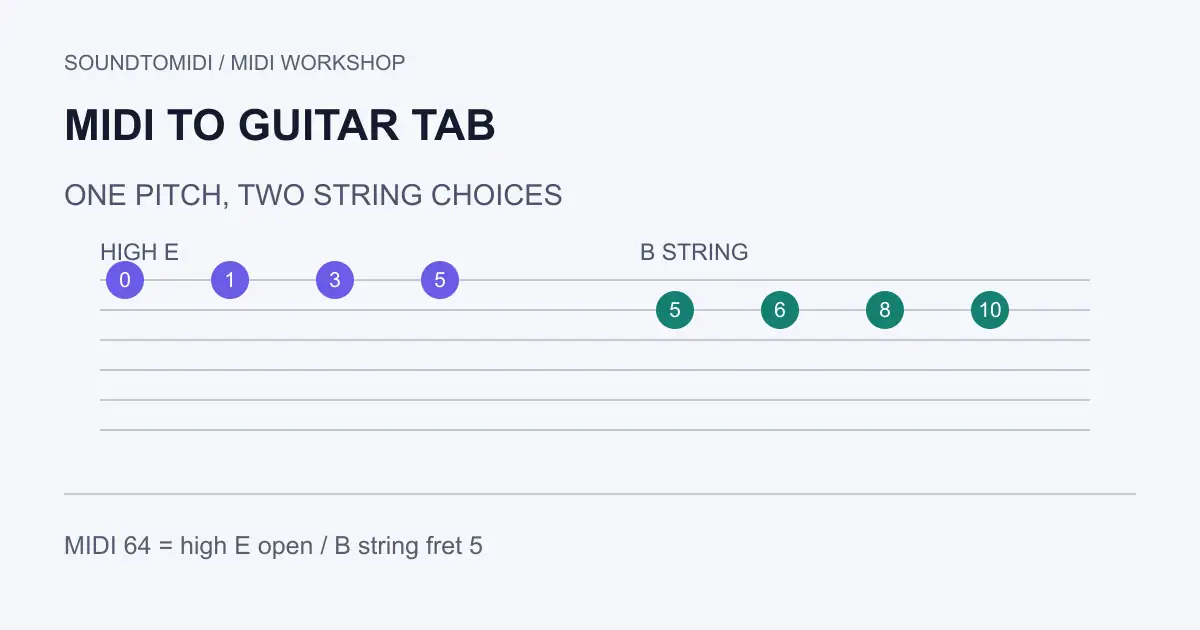
Download the original guitar-range MIDI phrase. It contains pitches 64, 65, 67 and 69, starting on consecutive beats at 120 BPM. Each note lasts half a beat. It is a constructed example, not a transcription benchmark.
| MIDI pitch | First-string option | Second-string option |
|---|---|---|
| 64 | Open high E | B string, fret 5 |
| 65 | High E, fret 1 | B string, fret 6 |
| 67 | High E, fret 3 | B string, fret 8 |
| 69 | High E, fret 5 | B string, fret 10 |
Both columns produce the same sounding pitches in standard tuning. They feel different under the hand. The first uses an open string and lower frets; the second stays on one string higher up the neck. An automatic tab conversion cannot determine which you intended from these notes alone.
For this example, the calculation is simple: fret = note pitch − open-string pitch. The high E string is MIDI 64 and the B string is 59. A negative result cannot be played on that string. A fret beyond your instrument’s range is also invalid. These numbers avoid the octave-label differences between music applications.
Prepare the MIDI before making a score
Listen to the melody and inspect its notes. Remove obvious extra notes from the accompaniment, correct any wrong octave, and keep an untouched copy. A low bass note does not become playable on guitar just because the tab software places a number somewhere.
Check whether the line is monophonic or contains deliberate chords. Two simultaneous notes assigned to the same string cannot both sound independently. For a chord, allocate different strings and test the stretch as a shape. A set of individually reachable frets can still form an impossible chord.
Choose the actual tuning before refining fingerings. Drop D, a capo and a seven-string instrument change the decisions. In standard tuning, the open strings from lowest to highest are MIDI 40, 45, 50, 55, 59 and 64. Do not apply that table to a different tuning without updating it.
Use a notation editor for the tablature
MuseScore Studio supports standard, tablature and percussion staff types. Its Staff/Part properties documentation describes opening those settings from a staff’s context menu and configuring string tuning. Use a guitar tablature staff appropriate to your instrument.
Import the MIDI, review the rhythm interpretation, and copy the desired passage onto the tablature staff. MuseScore’s copy and paste guide explains range selections. Keep a standard notation staff alongside the tab while checking pitches. This workflow is based on the documentation; this article’s file checks do not constitute a native MuseScore import test.
An automatic placement is a draft. Play the phrase slowly on the instrument, change awkward string choices, then check it at the intended tempo. Preserve notes while making these fingering edits: moving to another string should compensate with a different fret, not accidentally transpose the melody.
Fix rhythm before polishing the printout
MIDI note timing and notated rhythm are different representations. A slightly late note may import as an awkward rest or tie. Choose a reasonable rhythmic grid for the performance, but do not force a swung or triplet phrase into straight sixteenths just to simplify the appearance.
The example should show four consecutive beat positions with short notes between them. If it imports as a much faster or slower phrase, inspect the tempo and timing interpretation first. If every pitch is twelve semitones wrong, use the octave diagnosis guide before changing string tuning to compensate.
Finally, play the exported score or reopen its MIDI and compare the sounding notes. A readable PDF is useful, but it does not prove that its fingerings or playback are correct.
Starting from an MP3 instead of MIDI
Use MP3 to MIDI to produce a note draft, ideally from a short exposed guitar line. Review that draft before moving it into a score editor. A full mixed song can contain overlapping instruments and transcription errors; tablature conversion does not repair them automatically.
SoundToMIDI’s MIDI editor can help inspect a simple note phrase. It is not a guitar fingering solver or a lossless multitrack score converter. For the finished tab, keep the notation project with your tuning and fingering decisions, alongside the original MIDI.