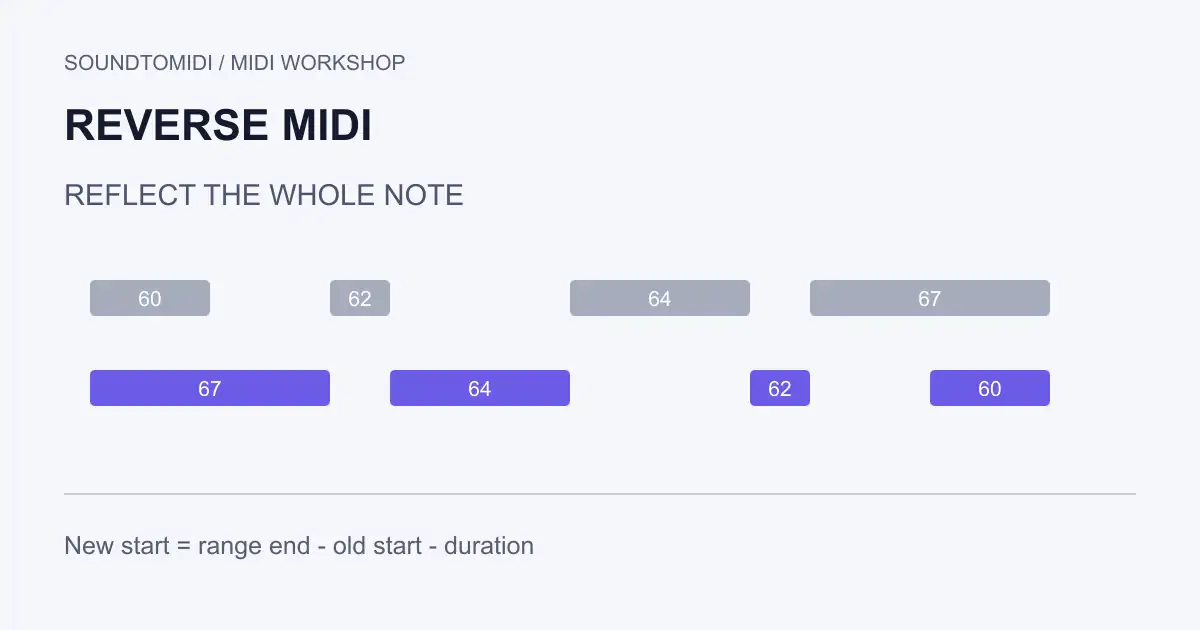
To reverse MIDI, reflect the notes across a chosen time range and keep each note’s duration. This reverses the sequence of musical events. It does not reverse the recorded sound of an instrument: a piano note still begins with its normal attack.
Choose the boundary first. Reversing a two-bar clip, reversing only its selected notes, and reversing a phrase up to its final note release can produce different rests and starting positions. The difference is usually the selected range, not a broken MIDI file.
SoundToMIDI does not currently have a one-click reverse command. The free example files and calculation below let you check the operation in your own MIDI editor or DAW.
Download an asymmetric example
The forward phrase and reversed phrase use 120 BPM and 480 ticks per quarter note. The reversal range is tick 0 through tick 1920: one 4/4 bar. The notes have unequal lengths so that a timing mistake is easy to spot.
| Pitch | Original start | Duration | Reversed start |
|---|---|---|---|
| 60 | 0 | 240 | 1680 |
| 62 | 480 | 120 | 1320 |
| 64 | 960 | 360 | 600 |
| 67 | 1440 | 480 | 0 |
All values in the table are ticks. Sorted by playback time, the reversed phrase is 67, 64, 62, 60. Each pitch retains its original duration and velocity. The four-note fixture was constructed for this guide; it does not represent an audio-transcription quality test.
For a note beginning at s with duration d, reflected inside [a, b], the new start is:
new_start = a + b − (s + d)
The note’s end matters. Using only b − s places the original first note at the end boundary and lets it run past the phrase. In our example, pitch 60 belongs at tick 1680, not 1920, because it lasts 240 ticks.
Make the time selection explicit
Duplicate the source clip and label the copy. Decide whether leading and trailing rests are part of the musical idea. For a one-bar loop, keep the bar boundary even when the last note is short. For a free-time phrase, you may instead choose the exact beginning and ending you want.
Select only the intended notes. If your file contains a melody and a drum track, reversing both may be an interesting arrangement choice, but it is not required to reverse the melody. Keep other parts separate until you have compared the result.
Check notes that cross either edge. Decide whether to include them in full, shorten them to the boundary or leave them outside this operation. Do not silently reflect a partial note using its old full length; that can create an unexpected negative start.
Use a MIDI reverse operation
Ableton Live 12’s MIDI utilities documentation describes Reverse as a horizontal reversal of selected notes. With no notes selected, it operates on the clip’s notes. Check the affected range in the piano roll and compare the result against your intended boundaries.
Other editors may reverse a selection, an item or a whole clip. Inspect the first and last note after applying the command rather than assuming the name guarantees the same boundary behavior. The formula above defines our example precisely, but is not a claim that every program uses its range in exactly the same way.
If you are coding the transformation, pair note-on and note-off messages before moving events. Move each complete note, sort events by their new time, and write valid nonnegative delta times. Merely reversing the order of raw MIDI messages puts note-offs before their matching note-ons.
Decide what to do with expression
The example contains notes and a fixed tempo, with no pedal, pitch-bend or expression automation. A real performance can contain all of those. Keeping the notes correct while leaving controller data at its old positions may change the phrasing substantially.
For sustained piano, check pedal-down and pedal-up messages. For a bent guitar or synth line, inspect pitch-bend at the new note positions. A note-focused editor may not preserve those events at all. Keep the original project if these details matter, and use a sequencer that exposes the relevant lanes.
Tempo changes need a separate decision. Reflecting beat positions while retaining a changing tempo map does not guarantee a reflection in seconds. Our fixed 120 BPM example avoids that ambiguity; do not generalize its timing to a freely changing tempo performance.
Reverse audio only when that is the intended sound
If you want a swelling reverse-piano sound, render the instrument to audio and use an audio reversal operation. That is a different task from putting MIDI notes in reverse order. MIDI reversal preserves the instrument’s forward-playing envelopes.
Reopen the exported MIDI and inspect it before replacing the original. Confirm four notes for this example, the same pitches and durations, a first start at zero and a final end at tick 1920. A MIDI event or note table can help when a piano roll makes the exact positions difficult to read.